
Editor Layout
OCTAVE's interface is split into resizable panels. Drag any divider to adjust their widths or heights — sizes persist between sessions.
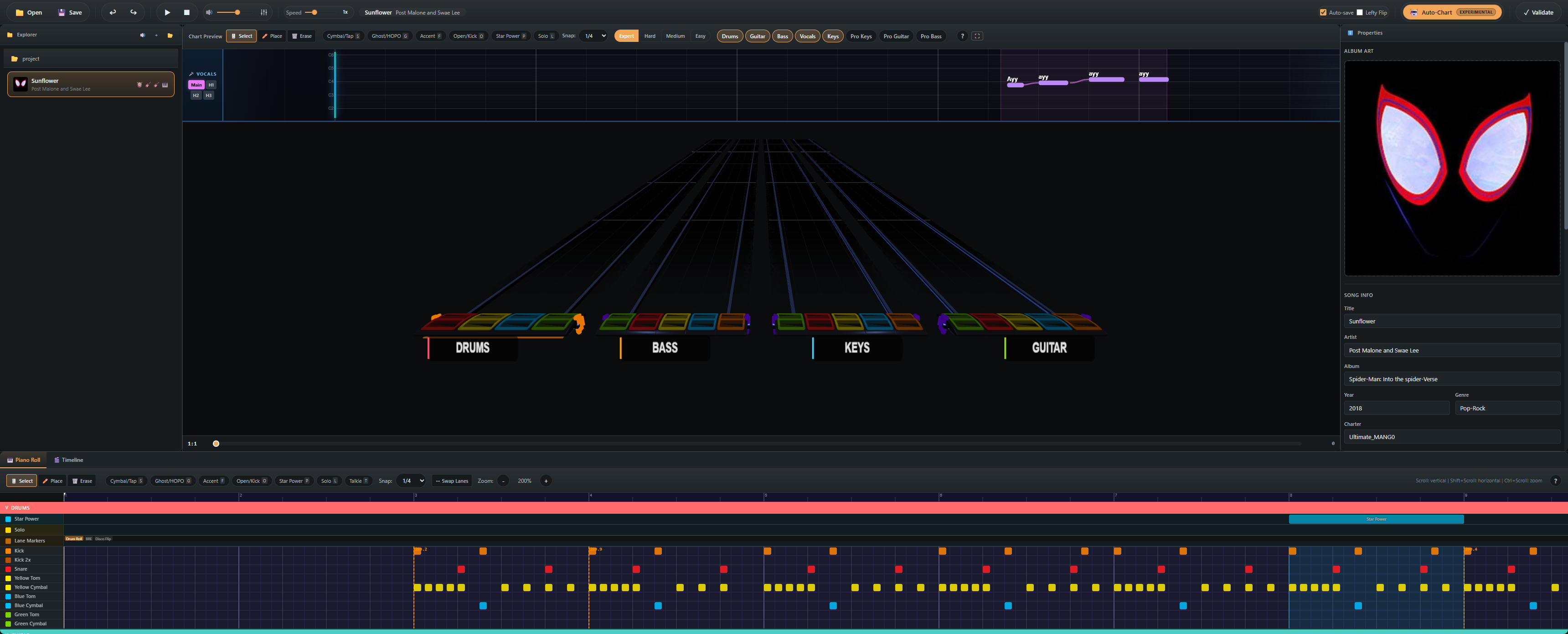
Toolbar
The strip across the top of the window. From left to right:
- Playback controls — play / pause, stop, transport position
- Tool selector — Select / Place / Erase (
1/2/3) - Modifier toggles — Cymbal / Tap, Ghost / HOPO, Accent, Open / Kick (context-aware per instrument)
- Snap division — 1/4 through 1/64
- Volume + Speed sliders — playback gain and rate
- Stems Mixer button — opens the per-stem volume / mute / solo popover (guide)
- Auto-Chart button — opens the auto-chart modal (guide)
- Save / Export
- Settings — opens the Settings modal
Project Explorer (left panel)
The list of songs in the currently-open project folder.
- Each song shows its album art thumbnail, title, and artist.
- A dot next to a song indicates unsaved changes.
- Click a song to load it; switching songs auto-saves the current one if you have Autosave enabled.
- Right-click for per-song actions (rename, reveal in folder, remove from project).
MIDI Editor (center)
The main 2D editor — a canvas-based piano roll. See the MIDI Editor guide for tools and modifiers.
- Top of the area: instrument tabs (Drums, Guitar, Bass, Keys, Pro Keys, Vocals, Pro Guitar, Pro Bass).
- Below the tabs: difficulty selector (Expert / Hard / Medium / Easy).
- Below that: the lanes themselves, with the playhead overlay and beat grid.
Chart Preview (right or stacked)
The 3D YARG-style highway. Plays in lockstep with the MIDI editor. See the Chart Preview guide.
Property Panel
Context-sensitive inspector:
- With nothing selected: song metadata (artist / title / album / charter / etc.) and tempo events list.
- With a note selected: pitch, velocity, length, modifiers.
- With multiple notes selected: bulk-edit common modifiers.
Bottom Panel
Tabbed area at the bottom of the window:
- Audio — multi-stem waveform with playhead
- Video — chart video sync editor
- Lyrics — text editor for vocals lyrics with bulk paste
Resizing & layout reset
Drag any panel divider. To restore defaults: Settings → Layout → Reset Panels.