Auto-Chart — Advanced Options
The Advanced disclosure in the Auto-Chart modal exposes everything you can tune about a generation run.
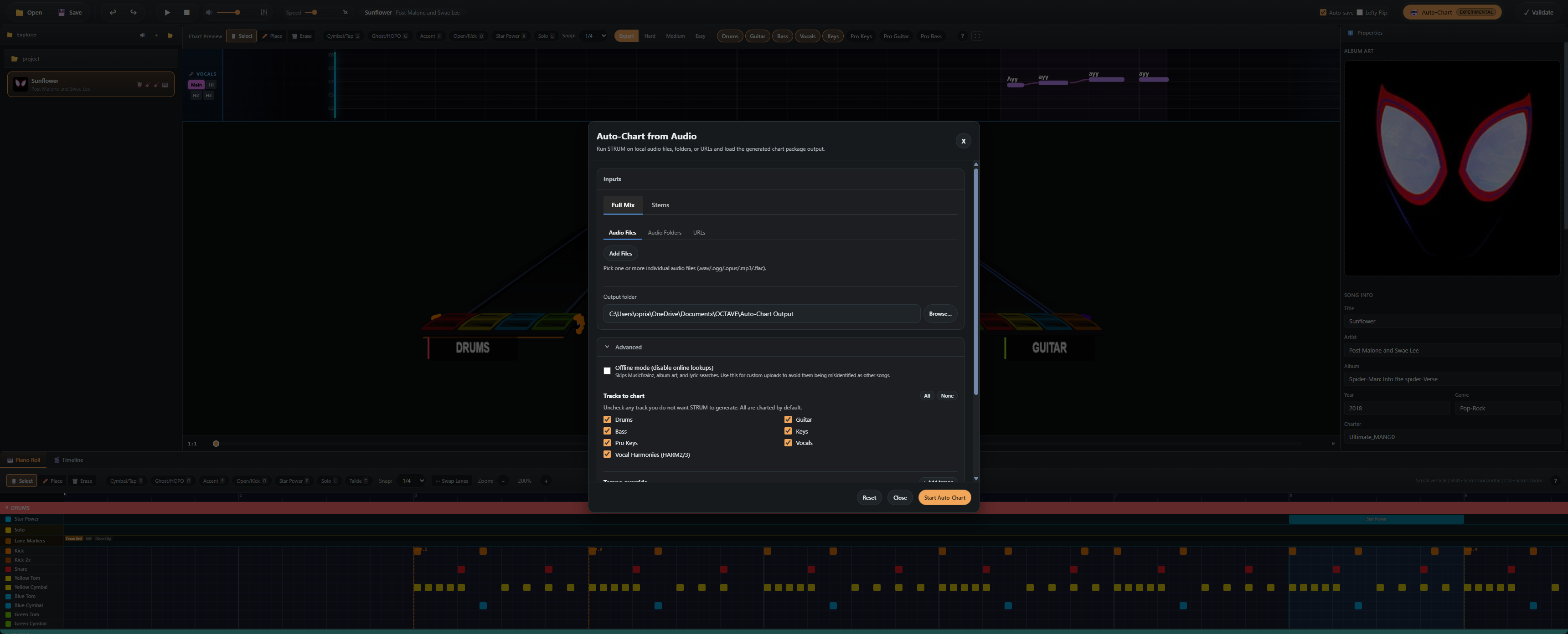
Tracks to chart
By default OCTAVE produces all five instruments. Uncheck any to skip its stage entirely:
- Drums — kick / snare / cymbals / toms from the drums stem
- Guitar — pitched guitar from the
otherstem - Bass — pitched bass from the bass stem
- Keys — pitched keys from the
otherstem (off by default — usually noisy) - Vocals — lead melody from the vocals stem
- Harmonies (HARM2 / HARM3) — additional harmony lines (off by default)
Skipping a track shaves real time off the run — drums-only is the fastest configuration.
Manual BPM & tempo map
By default the tempo is detected automatically. If detection misbehaves you can provide your own:
- Manual BPM — a constant tempo (one number)
- Tempo map editor — a list of
(time, BPM)events for songs with tempo changes
When a manual tempo map is provided, OCTAVE retimes the auto-detected events to that grid using mido — so notes still land on bars/beats correctly.
Use this when you already know the song's tempo (e.g. you have a click track from the original session).
Offline mode
Skips any network calls — no model downloads, no yt-dlp. Requires:
- The bundled Python runtime to already be present (run Auto-Chart once online first).
- All required model weights cached locally.
Useful for charters working offline or in CI.
Output structure
A successful run produces a folder named after the song:
My Song - Some Artist/
├── notes.mid          # Full chart
├── song.ini           # Title, artist, charter, length, etc.
├── drums.ogg          # Drums stem
├── bass.ogg           # Bass stem
├── vocals.ogg         # Vocals stem
└── song.ogg           # Everything else (the "other" stem)
Drop the folder into your YARG / Clone Hero songs library and it's playable immediately.
Performance tips
- Use a GPU — the bundled runtime auto-detects CUDA on Windows / Linux and Metal on macOS.
- Pre-split stems — if you already have stems, point Auto-Chart at the folder. Skipping Demucs cuts ~40% of runtime.
- Skip Keys & Pro Guitar — these are the noisiest output and rarely worth keeping for typical pop / rock material.
Where logs go
Every Auto-Chart run writes a log file you can attach to bug reports:
- Windows:
%APPDATA%/octave/logs/strum-<timestamp>.log - macOS:
~/Library/Logs/octave/strum-<timestamp>.log - Linux:
~/.config/octave/logs/strum-<timestamp>.log